Cracking the code to ecommerce success starts with conversion rate optimization (CRO). But here’s the twist—most ecommerce businesses overlook the strategies that actually make a big difference. What if a few adjustments could transform your online store, generating over $10M? Well, these 12 proven hacks have done just that.
Let’s explore how!
What is eCommerce Conversion Rate Optimization (CRO)
eCommerce conversion rate optimization (CRO) improves an online store to increase conversions, like purchases or sign-ups. It involves analyzing user behavior, optimizing product pages, navigation, and checkout, and fixing issues like slow load times. By refining these areas, businesses can boost conversions, lower bounce rates, and maximize revenue from existing traffic. CRO turns casual visitors into paying customers with data-driven strategies.
What's a "Good" eCommerce Conversion Rate
A 'good' eCommerce conversion rate typically falls between 2%-5%, but this can vary depending on the industry, product type, and audience. Understanding how factors like user experience, traffic quality, and product relevance influence conversions can provide valuable insights into optimizing performance.
1) Study how customers behave on your site and adjust accordingly
One of the BEST ways to optimize eCommerce CRO is by reading a website heatmap tool like heatmap.com to observe user behavior, identify friction points, and uncover actionable insights to optimize your site for better engagement and conversions.
Here are some critical elements heatmap helps you uncover:
| Feature | How It Helps |
|---|---|
| Scroll Maps | Identify where users stop scrolling on long pages. Reposition important CTAs or content higher for visibility. |
| Click Maps | Spot high-interaction areas like menu items or buttons with website click-tracking software. Optimize frequently clicked elements and fix issues. |
| Rage Clicks | Detect repeated clicks on unresponsive elements, like broken buttons. Fix usability errors to reduce frustration. |
| Session Recordings | Observe user journeys to find stumbling blocks like confusing navigation or slow pages. Simplify and optimize flow. |
| Form Analytics | Discover where users abandon forms. Simplify forms or add inline validation to reduce drop-offs. |
| CTA Effectiveness | Track clicks on CTAs to test variations in placement, design, or wording, and improve underperforming CTAs. |
| Navigation Issues | Analyze navigation challenges like overuse of the back button. Simplify menus and improve internal linking. |
| Product Page Interaction | Identify popular product images or descriptions. Enhance pages with features like 360-degree views or interactivity. |
Read next: 7 Landing Page Optimization Tools You Need to Try
Example: Obvi 100x'd their ROI using a heatmap
Before using heatmap.com, Obvi relied on Microsoft Clarity but lacked revenue-based analytics, hindering scalable ad spend. Switching to heatmap brought better site speed and more interaction accuracy, like this one CRO recommendation about moving the CTA button higher:
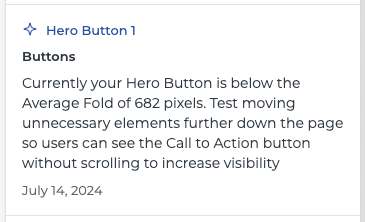
heatmapAI, heatmap’s CRO recommendation engine, gave Obvi multiple recommendations (like the one pictured above), which added $2.5 million in revenue to their sales. This was a 100x Return on Investment in Obvi’s first month with heatmap!
Try heatmap.com | Your eCommerce site will thank you (so will your wallet)
We are the only onsite analytics platform that tells you how to make more money - down to the pixel. Trusted by 1000+ eCommerce brands.

Ashvin Melwani
@ashvinmelwaniWith heatmap, I've been able to figure out what elements actually increase AOV and optimize our landing pages to drive more first purchase profitability, we're up 23% YoY

Read next: How to Reduce Your eCommerce Bounce Rate
2) Optimize your checkout flow
A smooth and efficient checkout flow can make or break your ecommerce conversion rate. Small adjustments like reducing friction points can drive ecommerce conversions while improving the overall user experience.
Some key ways to optimize your checkout process are:
- Free shipping: Offering free shipping eliminates one of the biggest barriers for online shoppers and reduces cart abandonment.
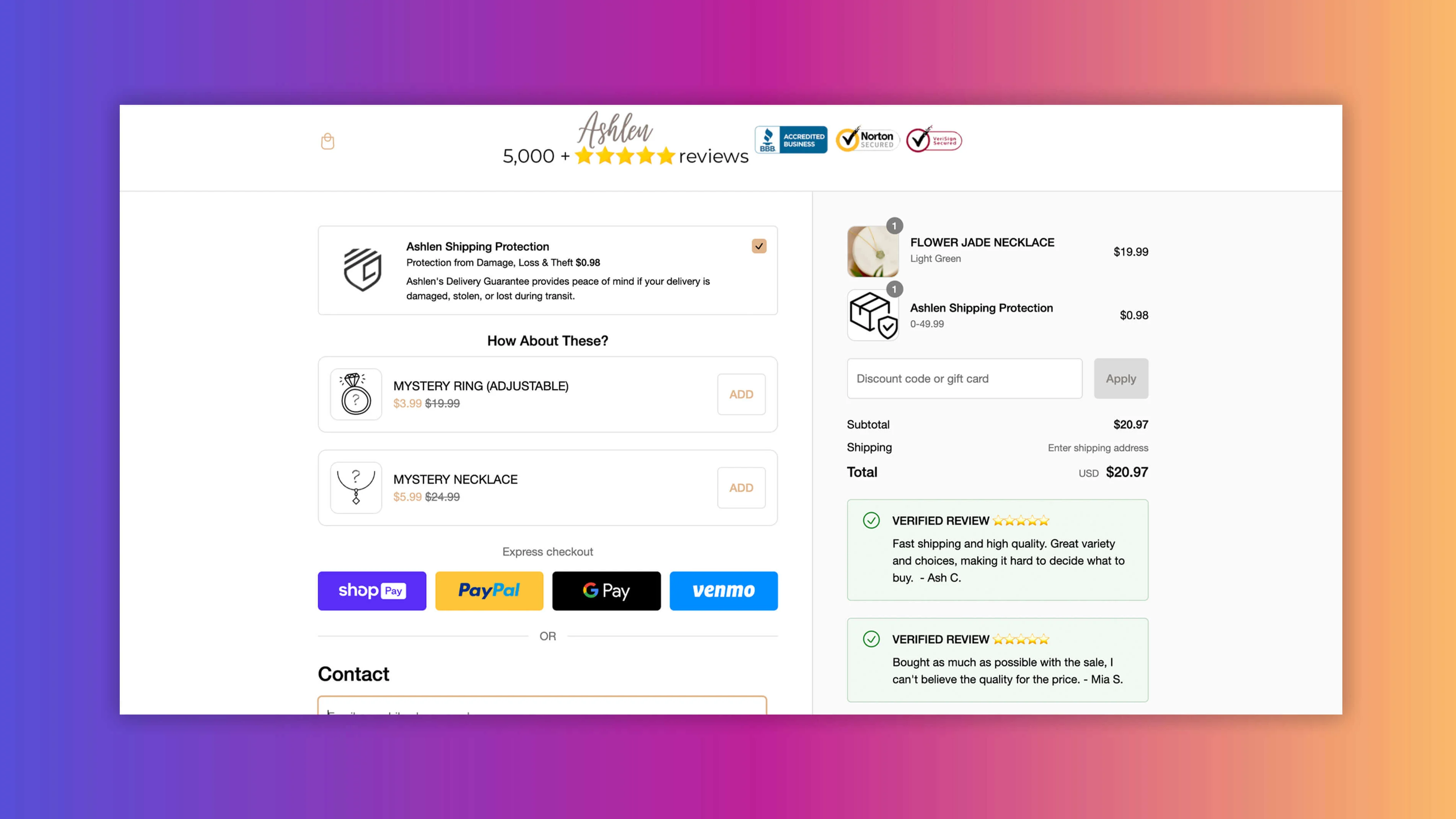
- Customer testimonials: Add testimonials like “Fast shipping and excellent service!” at checkout to build trust and reassure potential customers.
- In-checkout upsells: Suggest related products to boost the average order value without disrupting the buying process.
- Secure payment methods: Clearly display payment logos to enhance trust and ensure users feel secure while completing transactions.
- Progress bar: Show a visual indicator of checkout stages to motivate customers to finish their purchase.
- Countdown timers: Create urgency by highlighting limited-time offers, driving faster decisions.
- Return and refund policies: Display clearly visible policies to eliminate risk and encourage more conversions.
3) Add filters to product category pages
Adding well-placed, intuitive filters to product category pages is a simple yet highly effective way to improve user experience and boost conversions. Filters empower users to refine their searches quickly, eliminating the frustration of finding products on their own.
Case in point with a UK fashion brand
A rapidly growing UK fashion brand faced a common issue - users were frustrated by lengthy product searches and out-of-stock items on product pages.
Although a filter was available, its placement at the top of the Collection List Page (CLL) made it underutilized. Users would scroll down, find products, and then have to return to the top to use the filter, creating unnecessary friction.
Partnering with heatmap.com and That Works Agency, they leveraged scroll-depth analysis and session recordings to uncover key insights:
- Users who engaged with the filter generated 3x more revenue than those who didn’t.
- Most users only accessed the filter after scrolling extensively, leading to abandoned searches.
So, they ran an A/B test:
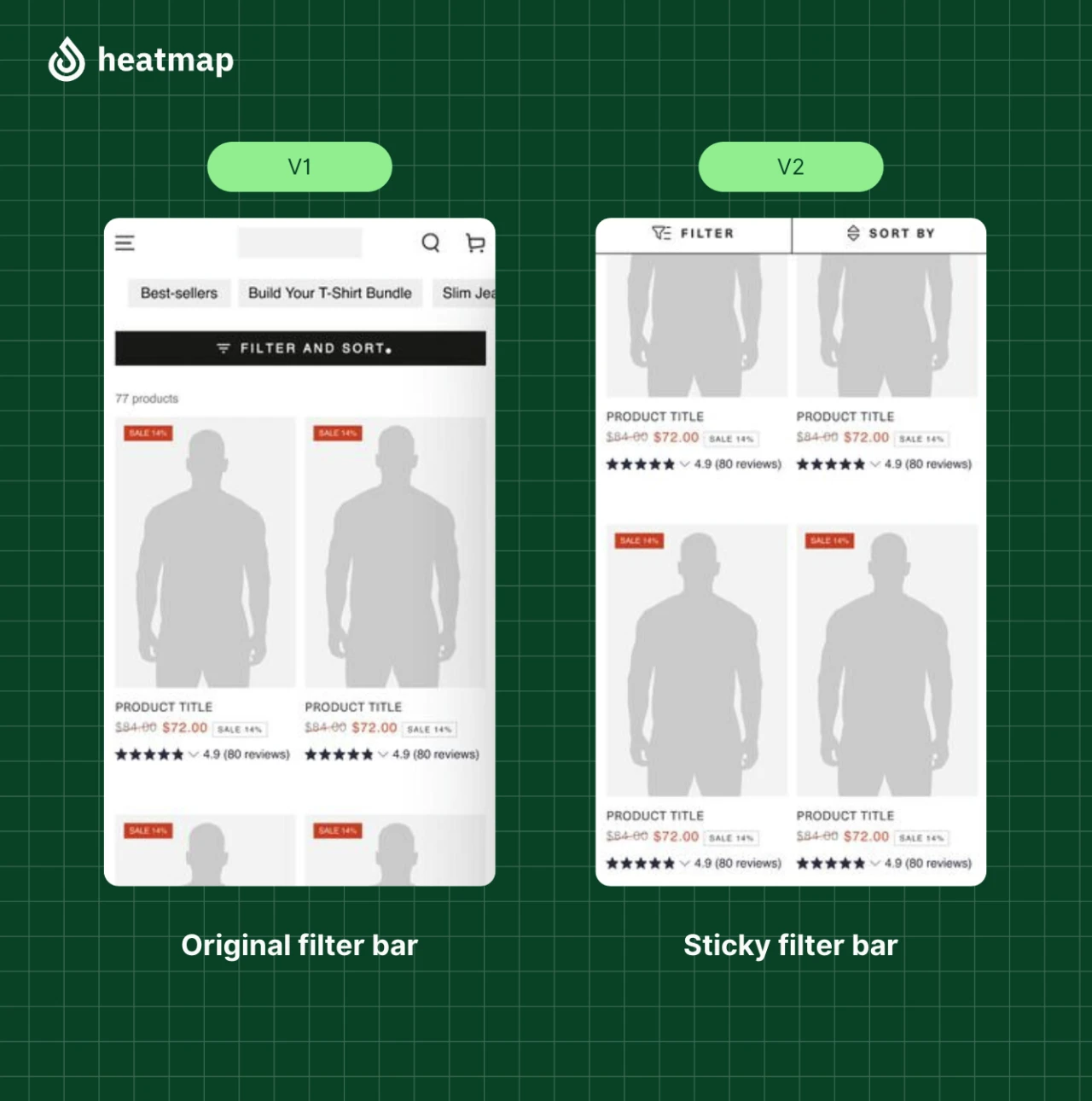
Results
After running an A/B test, the changes drove:
- +4.22% increase in conversion rate
- +13.07% increase in revenue per visitor
- +14.19% increase in average basket size
- +34.48% increase in filter usage
These optimizations led to a 13% increase in revenue, showcasing how critical filter accessibility is to conversions.
Key Takeaway: Filters are more than just a convenience; they’re a revenue-driving tool when optimized effectively. heatmap’s revenue-linked behavioral insights allowed this brand to identify underutilized opportunities and implement high-impact changes.
How 'That Works Agency' Boosted Revenue Per Session by +13% with heatmap
By leveraging heatmapAI, That Works Agency improved filter engagement and addressed key friction points in online shopping. Their efforts led to measurable gains in average basket size and overall conversions, transforming a simple design tweak into a major revenue-driving improvement.
+4.22%
Increase in Conversion Rate
+13.07%
Increase in RPS
+14.19%
Average Basket Size Increase
4) Add trust signals and display social proof
Building trust is vital for increasing ecommerce conversions. Trust signals and social proof reassure potential customers, improving confidence and reducing hesitation during the buying journey.
Let's see how you can effectively integrate them into your ecommerce site:
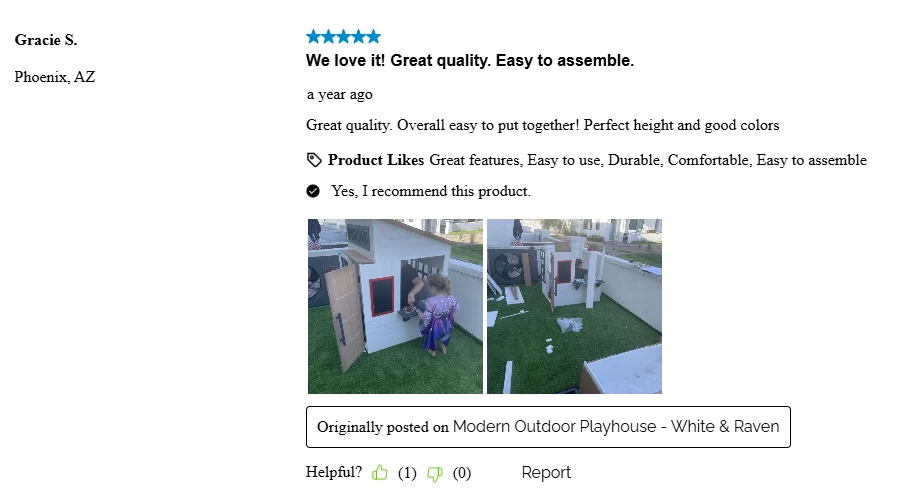
- Customer testimonials: Feature glowing reviews on landing pages, product pages, and the checkout page to strengthen trust at key decision points.
- Case studies: Include success stories or real-life examples on your category pages or product detail pages to highlight the value of your offerings.
- Trust badges: Display secure payment logos, free shipping icons, and guarantee seals near CTAs and on the checkout page to eliminate risk.
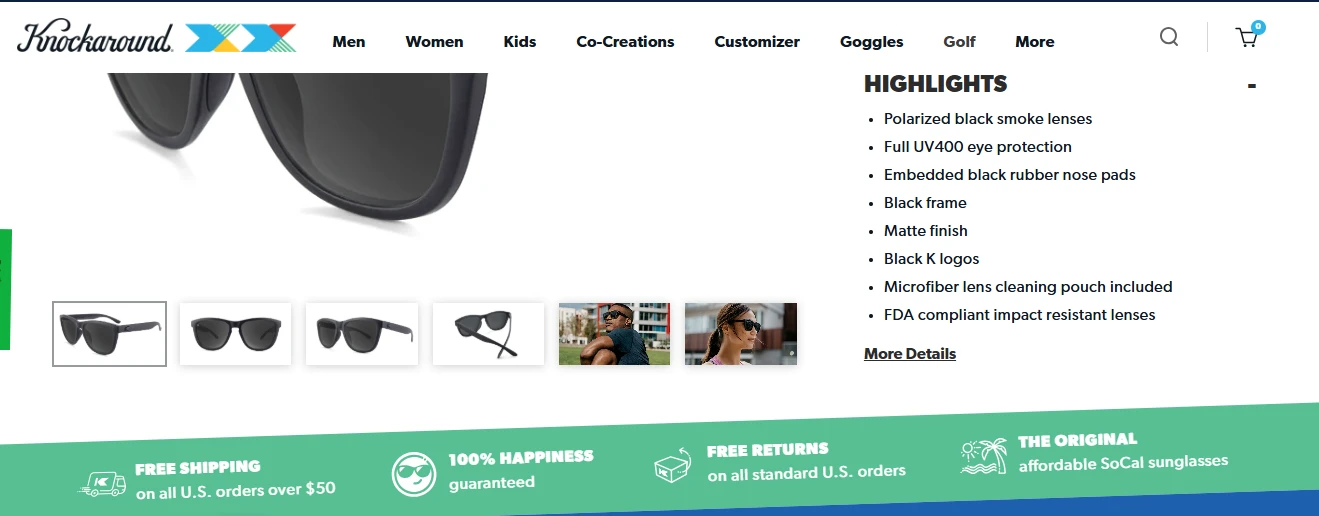
- Social proof popups: Show live notifications of recent purchases or product views to create a sense of credibility and FOMO for online shoppers.
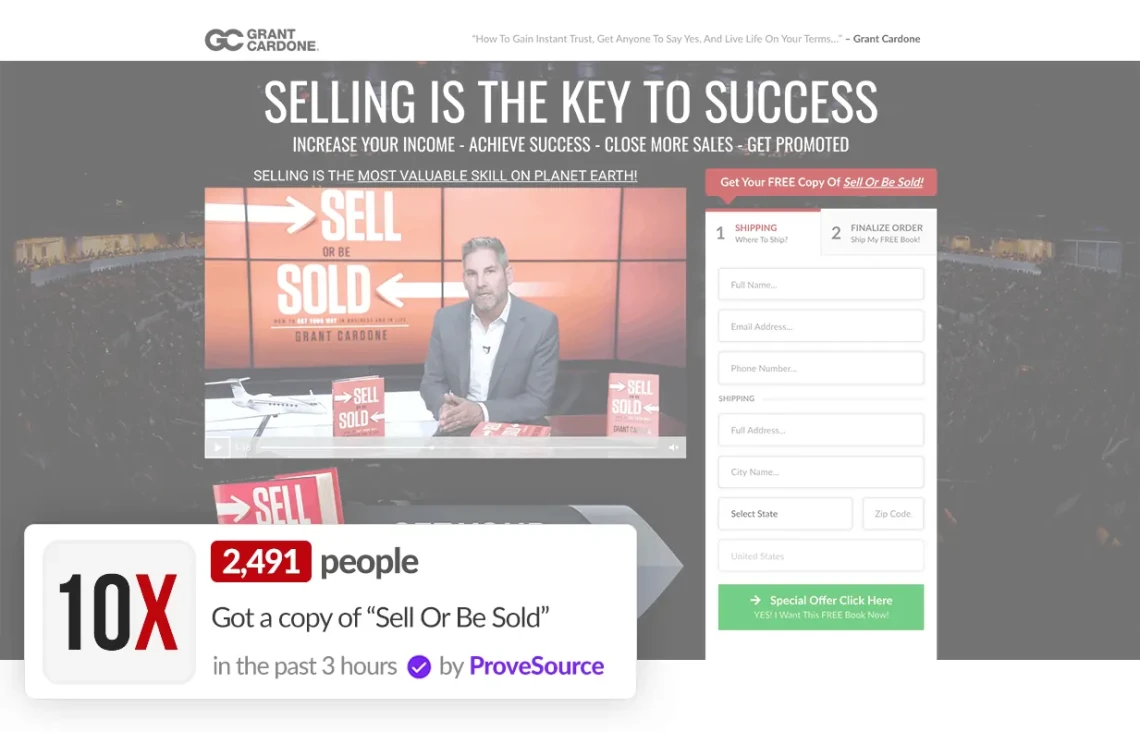
By strategically placing these elements, ecommerce websites can increase trust, improve user behavior, and drive ecommerce conversion rate optimization effectively.
5) Don't sleep on cart abandonment
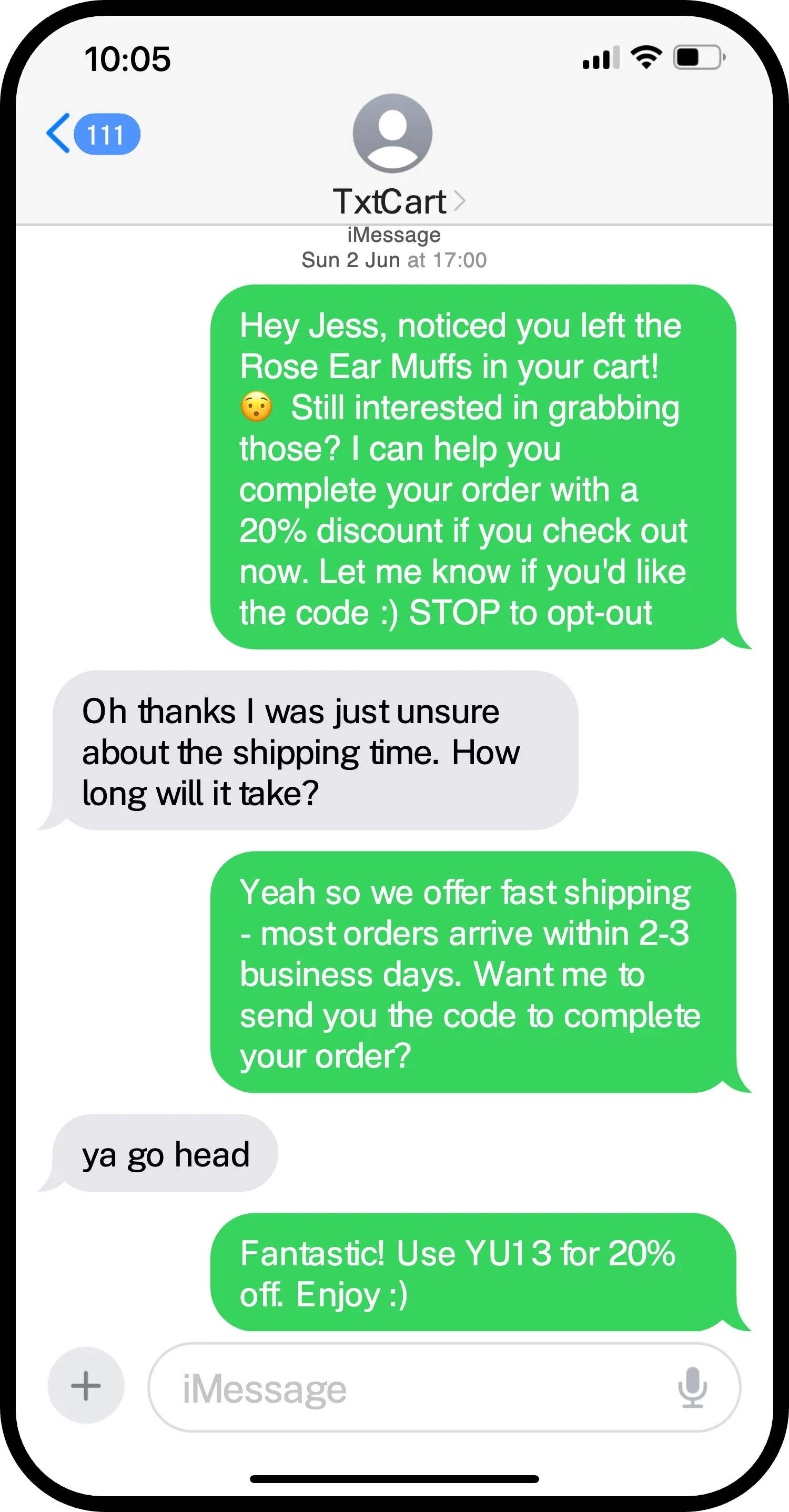
Cart abandonment is a major hurdle for ecommerce businesses, but it’s also an opportunity to recover lost revenue. While email is a popular tool for cart recovery, SMS marketing often outperforms it, thanks to its immediacy and high engagement rates.
On average, SMS campaigns boast a click-through rate (CTR) between 20%-35%, compared to email’s CTR, which typically ranges from 1% -10%. This makes SMS a more effective way to re-engage potential customers and boost ecommerce conversions.
Leverage personalized, timely SMS reminders to nudge shoppers back to complete their purchases. Highlight key details like discounted items, limited stock, or free shipping offers to create urgency and boost conversions.
Pro tip: For even better results, you can leverage TxtCart's conversational AI, which sends human-like recovery messages tailored to user behavior. By mimicking real conversations, it builds trust, encourages interaction, and drives ecommerce conversions—turning abandoned carts into completed checkouts seamlessly.
6) Allow guest checkout
Forcing account creation often leads to cart abandonment, as many online shoppers prefer a quick and hassle-free checkout. By offering a guest checkout option, ecommerce sites can remove this barrier and encourage potential customers to complete their purchases without delays.
Keep the process simple by asking for only essential information and offering the option to create an account later. Enhance trust with secure payment badges and convenient payment options, creating a smooth experience for both first-time and returning mobile users—ultimately boosting ecommerce conversion rates.
7) Ask visitors how they found your site
Understanding how website visitors discover your ecommerce store is a key step in improving your conversion funnel. By simply asking, businesses can gain valuable insights into their most effective marketing channels and refine their digital marketing strategy.
Use these methods to gather feedback:
| Method | Description |
|---|---|
| Pop-ups | Prompt visitors with a short question during browsing or checkout. |
| Short surveys | Place a quick survey on the checkout page or post-purchase screen to capture immediate insights. |
| Follow-up emails | Ask in a post-purchase email to engage and learn from existing customers. |
Ask targeted questions such as:
- How did you hear about us?
- What made you visit today?
Keep the options concise like—social media, search engines, word of mouth, or paid ads—and include an "Other" option for additional insights.
Once you’ve collected responses, analyze the data to identify high-performing channels and areas for improvement. For example, if most visitors come from search engines, you can double down on SEO efforts. These insights help optimize ecommerce CRO strategies, tailor your efforts to your target audience, and drive more conversions.
8) Implement exit-intent popup offers & surveys
An exit-intent popup is a powerful tool to re-engage visitors who are about to leave your ecommerce site. These popups detect when a user is about to close the page and present an irresistible offer or survey to encourage them to stay or complete their purchase.
| Type of Exit-Intent Popup | Description |
|---|---|
| Discount Offer Popups | Provide a coupon or free shipping deal to incentivize immediate purchases. |
| Email Capture Popups | Offer exclusive perks, like early access to sales, in exchange for an email address to grow your list. |
| Product Reminder Popups | Highlight items left in the cart or recently viewed products to prompt completion. |
| Survey/Feedback Popups | Ask, “What stopped you from completing your purchase?” to gather insights for better conversion rate optimization (CRO). |
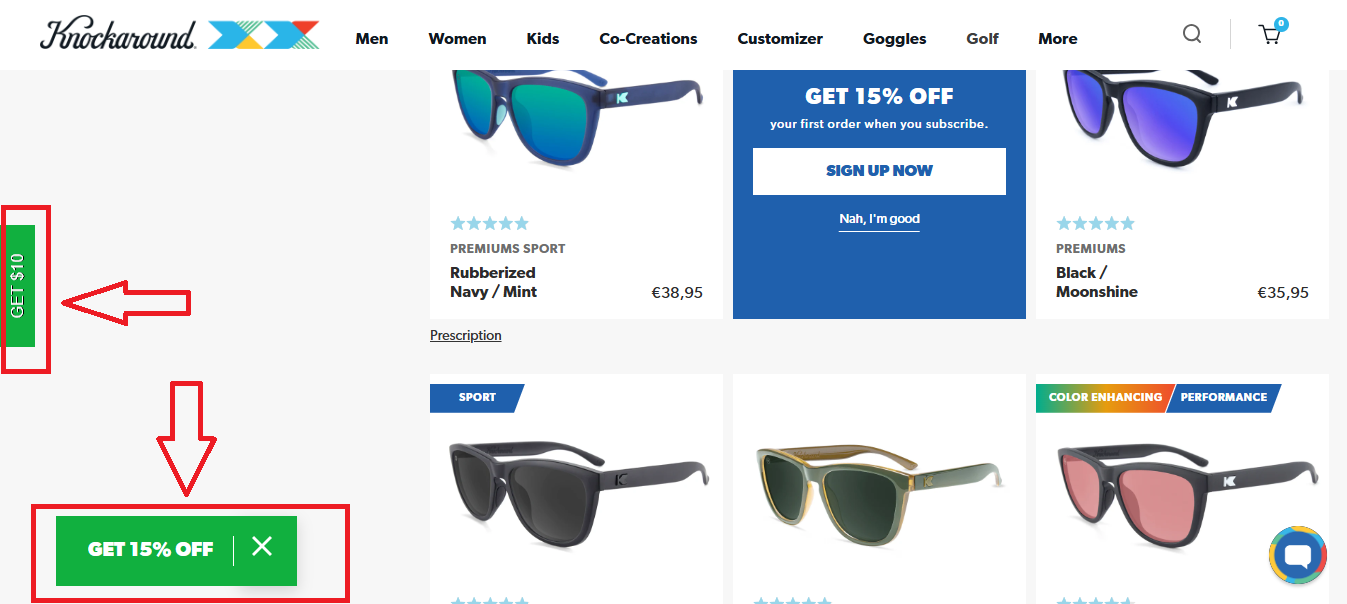
To drive ecommerce conversions, make popups visually appealing, include a clear CTA, and create urgency with time-sensitive deals.
Pro Tip: Use tools like Alia to create effective, customizable exit-intent popups and surveys that drive results while ensuring a seamless experience for your site visitors. This small tweak can lead to more conversions and valuable insights.
9) Make your website fast, intuitive, and compelling
A slow or clunky website is a surefire way to lose site visitors and hurt your ecommerce conversion rates. Research shows that even a one-second delay in page loading can cause a 7% drop in conversions and an 11% decline in page views. This highlights the importance of a fast-loading and user-friendly ecommerce website to keep visitors engaged and guide them seamlessly through the conversion funnel.
Here’s how to optimize your site:
- Improve site speed: Compress images, use a content delivery network, and minimize code to reduce load times for both desktop and mobile users.
- Simplify navigation: Use clear menus, breadcrumbs, and a site search bar to help visitors find products effortlessly.
- Mobile-responsive design: Ensure your site looks and works seamlessly on all screen sizes to accommodate mobile users.
- Compelling visuals and design: Use high-quality images and clear CTAs to grab attention and encourage more conversions.
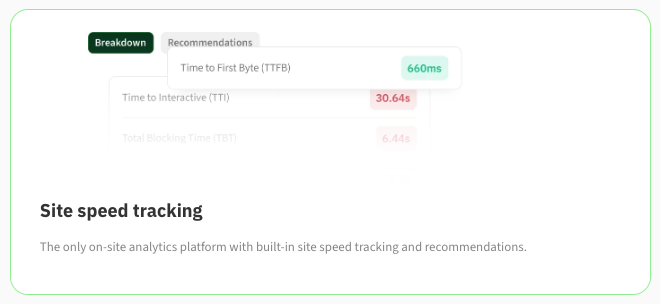
To take this further, heatmap.com stands out as the only on-site analytics platform that combines site speed tracking with AI-driven recommendations, giving you a clear and actionable view of areas for improvement.
10) Show customers your website's safe
Building trust is vital for ecommerce websites, and showcasing security is key to earning customer confidence. Use secure payment options like PayPal or credit cards and display trust badges prominently on the checkout page.
Adding SSL certificates and a visible privacy policy reassures site visitors their data is safe. Pair these with social proof, such as customer testimonials, to enhance credibility and boost ecommerce conversions, ensuring a secure and reliable shopping experience.
The products on your website should also demonstrate trust though. Below are some common examples of "trust seals" in different product categories:
| Product Category | Relevant Certifications/Licenses |
|---|---|
| Health & Supplements | FDA-Approved Badge, Clinically Tested, GMP (Good Manufacturing Practices) Certified |
| Organic & Food Products | USDA Organic Certification, Non-GMO Project Verified, Fair Trade Certified |
| Electronics & Consumer Goods | CE Mark (Europe), FCC Certification (U.S.), RoHS Compliance |
| Skincare & Cosmetics | Leaping Bunny Certification, Hypoallergenic Tested, EU Cosmetic Regulation Compliance |
11) Minimize risk on user's end as much as possible
Reducing perceived risk is essential for increasing ecommerce conversions. Shoppers want assurance before committing, and addressing their concerns can help build trust and boost your ecommerce conversion rates.
Here’s how to minimize risks effectively:
- Hassle-free returns: Simplify the return process so shoppers feel confident in making a purchase.
- Money-back guarantees: Offer a full refund policy to reassure hesitant buyers.
- Secure payment options: Use trusted payment methods with clear trust badges to enhance customer confidence.
- Product warranties: Provide warranties for expensive items to ensure value and quality.
- Transparent shipping costs: Show clear, upfront shipping fees to avoid unexpected costs.
- Real-time order tracking: Keep customers informed by allowing them to track their delivery at every step.
- Accurate product information: Provide detailed product descriptions and images to set realistic expectations.
- 24/7 customer support: Ensure help is available anytime for questions or issues.
Pro Tip: Include try-before-you-buy offers and delivery insurance to further reduce customer hesitation and increase confidence.
12) Give customers FOMO
Creating a sense of urgency through FOMO (fear of missing out) can drive ecommerce conversions and encourage shoppers to act quickly. Use tactics like limited-time offers, countdown timers, or highlighting low stock levels on product pages to create urgency and trigger impulse purchases.
Here's a table outlining a few of the most effective ones being used by top eCommerce brands:
| FOMO Tactic | What It Is | Example |
|---|---|---|
| Limited-Time Bonuses | Instead of just discounting a product, offer an exclusive bonus that expires soon. | “Order within the next 2 hours to get a free gift with your purchase!” |
| Live Purchase Notifications | Show real-time activity from other shoppers to create urgency. | “Sarah from New York just bought this item!” or “5 people purchased this in the last hour.” |
| Expiring Discount Codes | Create a short-lived discount to push hesitant buyers to act. | “Use code FLASH20 in the next 30 minutes for 20% off!” |
| Pre-Order or Waitlist Demand | Highlight high demand for upcoming or restocking products. | “Join 1,500+ people on the waitlist – restock drops in 3 days!” |
These simple strategies can effectively engage site visitors and boost your ecommerce conversion rates.
Average conversion rates by industry
Conversion rates vary widely across industries, influenced by product complexity, buying behavior, and audience needs.
Here’s a quick breakdown:
- Retail: 1.9%
- Electronics and Home Appliances: 3.6%
- Home Décor: 1.9%
- Personal Care Products: 6.9%
- Cars and Automobile Parts: 1.57%
- Food and Beverages: 4.94%
- Pet Care: 2.33%
Average conversion rates by device
Device types play a critical role in user behavior, with desktop and tablet users often converting at higher rates than mobile users:
- Desktop Traffic: 3%
- Mobile Traffic: 2%
- Tablet Traffic: 3%
Calculating your eCommerce Conversation Rate
An eCommerce conversion rate is calculated by dividing the number of completed purchases by the total number of website visitors, then multiplying by 100 to get a percentage.
Formula:
(Number of Purchases ÷ Total Website Visitors) × 100
For example, if your e-commerce website had 10,000 visitors and 200 purchases, the conversion rate would be:
(200 ÷ 10,000) × 100 = 2%
Tracking this metric helps businesses understand how effectively users interact with their site and pinpoint areas for conversion optimization.
Key Metrics for Measuring eCommerce Conversions
Tracking the right metrics offers clear insights into your website's performance and highlights areas for improvement. By monitoring these metrics, businesses can identify friction points, enhance user experience, and drive higher conversions.
| Metric | Description | How to Improve |
|---|---|---|
| Bounce Rate | Percentage of visitors who leave after viewing a single page. | Study customer behavior with heatmaps, make the site fast, and create visually compelling pages to keep users engaged. |
| Exit Rate | Percentage of visitors who leave after viewing a specific page. | Use exit-intent popups with targeted offers or surveys and optimize the checkout flow to remove friction. |
| Click-Through Rate (CTR) | Percentage of users who click on a link from an ad or email. | Add trust signals near clickable elements and use FOMO-driven CTAs like “Hurry, sale ends soon!” |
| Average Session Duration | Average time users spend on your site. | Add filters to product category pages, enabling users to find what they need easily and explore further. |
| Average Page Depth | Tracks how many pages users visit during a session. | Optimize navigation and showcase related or "recently viewed" products to encourage deeper engagement. |
| Revenue Per Session (RPS) | Average revenue generated per website session. | Reduce cart abandonment with retargeting emails and streamline the checkout process by offering guest checkout for faster purchases. |
heatmapAI is your best friend for eCommerce CRO
HeatmapAI transforms conversation rate optimization into a data-driven process by showing exactly how users interact with your e commerce website. Its AI-powered revenue-based heatmaps reveal which elements drive sales, while tools like scrollmaps, screen recordings, and rage click analysis uncover friction points that hinder paying customers from completing purchases.
With features like site speed tracking, JavaScript error detection, and over 500 AI-generated recommendations, HeatmapAI ensures incremental improvements that lead to more conversions.
Why teams choose heatmap.com over other analytics tools

Read Next:

Dylan AnderPublished December 1, 2025