Heatmap ranks as the best Hotjar alternative for ecommerce stores because it tracks revenue per click instead of just visitor behavior. While Hotjar shows you where people click, Heatmap shows you which clicks generate sales. G2 reviews rate Heatmap at 4.7/5 for ecommerce features compared to Hotjar's 4.3/5.
Hotjar works fine if you're running a blog or a SaaS company. But for online stores, it's missing the one thing that actually matters: connection to your revenue data.
You can see that 800 people clicked your product image last week. Great. Did any of them buy anything? Hotjar doesn't know and can't tell you. You're making optimization decisions based on engagement metrics that might have zero correlation with sales.
We tested seven alternatives that do more than count clicks. Some track revenue. Some cost way less. Some work better for mobile apps or checkout optimization. Here's what we found.
Why Ecommerce Stores Outgrow Hotjar
Hotjar does everything okay. Heatmaps? Check. Session recordings? Sure. Feedback widgets? Got those too. It's the Swiss Army knife of behavior tracking tools, which means it's not particularly good at any one thing.
For ecommerce stores, the gaps show up fast:
Can't tell you which product images drive purchases versus window shopping. Can't connect your trust badge clicks to actual conversion rate changes. Can't show you if that size chart people keep clicking correlates with completed sales or returns. Can't distinguish between a click that led to a $500 order and a click that led to an abandoned cart.
You end up with a lot of colorful heatmaps that don't actually tell you what to fix or what's working.
And then there's the data accuracy thing. Go read through Hotjar reviews and you'll find stores complaining about mobile tracking issues. Clicks that didn't happen showing up in heatmaps. Session recordings that skip entire page interactions. When you're basing optimization decisions on faulty data, you're just making expensive mistakes faster.
How We Evaluated These Alternatives
We looked at what matters for running an online store, not for running a content site or a SaaS dashboard:
Revenue Attribution: Does it connect clicks to purchases? Most tools don't even try.
Ecommerce Platform Integration: Does it work with Shopify, WooCommerce, BigCommerce without needing a developer?
Mobile Tracking Accuracy: Touch interactions work differently than mouse clicks. Does the tool actually track them correctly?
Pricing for Ecommerce Traffic: Most stores get way more traffic than SaaS products. Does the pricing structure bankrupt you at 50,000 monthly visitors?
Session Recording Quality: Can you watch what actually happened, or are the recordings choppy garbage?
Setup Complexity: Can you install it today and start collecting data, or do you need to wait for your developer to get around to it?
We tested free trials where available, checked what features you actually get at different price points, and read through complaint threads to see what breaks when you scale up.
Also read: Hotjar Pricing: Is it Worth Your Money?
The 7 Best Hotjar Alternatives for Ecommerce
1. Heatmap: Best for Revenue Attribution
Best for: Stores that need to connect clicks to actual dollar amounts
Pricing: Starts at $117/month for stores with $0-$4.9M ARR
Key Features:
- Revenue-based insights showing dollars per page element
- AI-driven optimization recommendations
- Interactive scrollmaps
- 2-minute installation
- Native Shopify, WooCommerce, BigCommerce integrations
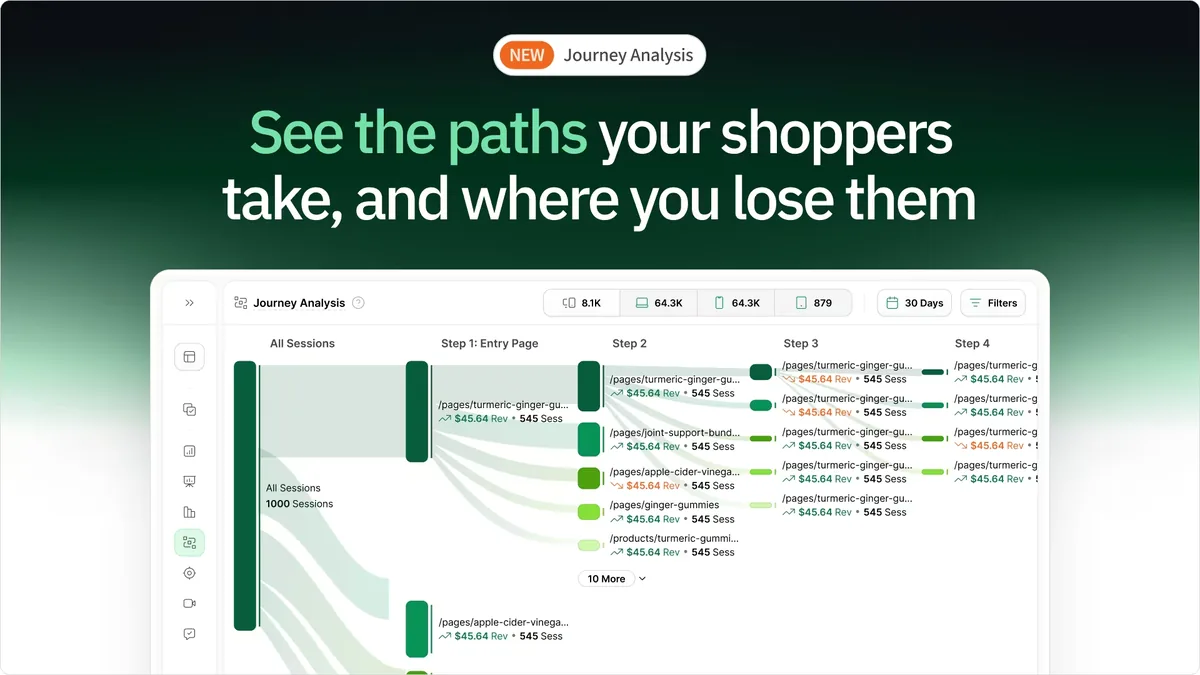
Why It's Better Than Hotjar: Heatmap only works for ecommerce stores and only tracks revenue per click. Not engagement. Not time on page. Revenue.
When your navigation menu shows $12,400 in monthly sales and your featured products slider shows $3,200, you know exactly where to focus your optimization work. Hotjar would just show you both got lots of clicks and leave you guessing which one matters.
The tool pulls data from your ecommerce backend and connects it to behavior. Someone clicks your "30-Day Returns" link, then buys something. Heatmap knows those events are related. Hotjar just knows the click happened at 2:47pm on a Tuesday.
Comparison to Hotjar:
- Revenue tracking: Yes vs no
- Ecommerce focus: Exclusive vs general tool
- Pricing: $117/month vs $39/month starting
- Mobile accuracy: Both solid
- Setup time: 2 minutes vs 5-10 minutes
Pros:
- Only tool that shows revenue per click
- Built for ecommerce, not adapted from general analytics
- Setup actually takes two minutes
- AI tells you what to fix based on revenue impact
Cons:
- Costs more than Hotjar
- Doesn't work well for stores under 500 monthly visitors
- No survey widgets if you need those
Rating: 4.7/5 on G2 for ecommerce features
Free Trial: 14 days, everything unlocked
2. Microsoft Clarity: Best Free Alternative
Best for: Stores on tight budgets or just starting out
Pricing: Free forever
Key Features:
- Unlimited heatmaps and session recordings
- Rage click and dead click detection
- Clean interface that loads fast
- Google Analytics integration
- No caps on sessions or traffic
Why Consider It: Microsoft decided to give away what Hotjar charges for. No catch. No upgrade nags. Just free heatmaps and session recordings with no usage limits.
The rage click detection finds spots where visitors repeatedly click things that don't work. That's more useful than regular heatmaps for finding conversion-killing UX problems. Someone clicking your "Add to Cart" button 8 times because it's not responding? Clarity flags that automatically.
Comparison to Hotjar:
- Cost: Free vs $39-$99/month
- Session recordings: Unlimited in both (Hotjar's free tier is limited)
- Surveys: Hotjar has them, Clarity doesn't
- Revenue tracking: Neither
- Data accuracy: Clarity users report fewer mobile issues
Pros:
- Actually free with no hidden costs
- Dashboard loads faster than Hotjar
- Rage click detection catches problems Hotjar misses
- No credit card, no trial period nonsense
Cons:
- No survey tools
- Reporting is pretty basic
- Can't track revenue
- Fewer integrations than Hotjar
Rating: 4.5/5
Free Trial: Not applicable, just free
3. Mouseflow: Best for Funnel Analysis
Best for: Stores obsessed with fixing checkout problems
Pricing: Starts at $39/month (same as Hotjar)
Key Features:
- Session replays with filtering that actually works
- Geo heatmaps showing where visitors are located
- Funnel analysis
- Form analytics at the field level
- Friction scoring that identifies problem areas automatically
Why It Beats Hotjar: Mouseflow's funnel analysis shows you exactly which checkout field causes people to quit. Not which page. Which field. Hotjar shows you page-level abandonment. Mouseflow shows you that requiring a phone number drops your completion rate 18%.
The form analytics track every field interaction. You can see that people pause for 12 seconds when they hit your shipping cost field, then 40% of them leave. That's specific enough to actually fix.
Comparison to Hotjar:
- Funnel depth: Way more detailed vs basic page funnels
- Form analytics: Field-level vs page-level
- Pricing: Same $39/month start
- Geographic data: Better vs limited
- Session limits: More restrictive at base tier
Pros:
- Funnel analysis is significantly better
- Field-level form tracking
- Geographic heatmaps included
- Friction scoring does the analysis for you
Cons:
- Session limits on lower tiers are tight
- No survey features
- Can't track revenue
- Interface looks old
Rating: 4.6/5
Free Trial: 14 days
4. Lucky Orange: Best for Real-Time Monitoring
Best for: Small stores with customer service teams
Pricing: Starts at $10/month (way cheaper than Hotjar)
Key Features:
- Real-time visitor dashboard
- Live chat built in
- Dynamic heatmaps
- Conversion funnels
- Form analytics
Why Stores Switch: Lucky Orange costs $10/month and includes live chat. Hotjar costs $39/month and doesn't. If you're a small store that needs basic heatmaps plus the ability to chat with confused visitors, you're saving $29/month plus whatever you were paying for a separate chat tool.
The real-time dashboard shows people currently on your site and what they're doing right now. Your support team watches someone struggle with checkout and jumps in before they give up. Hotjar only shows you what happened yesterday.
Comparison to Hotjar:
- Price: $10/month vs $39/month
- Live chat: Included vs need integration
- Real-time view: Yes vs no
- Feature depth: Less comprehensive vs more complete
- Session limits: More restrictive vs more generous
Pros:
- Costs a third of Hotjar
- Chat included, no extra tools needed
- Actually see visitors live
- Perfect for small stores
Cons:
- Base plan is pretty limited
- Session limits fill up fast if you get traffic
- Heatmaps are basic
- No revenue tracking
Rating: 4.3/5
Free Trial: 7 days
5. Smartlook: Best for Mobile App Tracking
Best for: Stores with websites and mobile apps
Pricing: Starts at $55/month
Key Features:
- Cross-platform tracking for web and mobile
- Automatic event tracking
- Session recordings
- Funnel analysis
- Crash reports for mobile apps
Why It's Better: Got both a website and a mobile shopping app? Smartlook tracks behavior across both from one dashboard. Hotjar makes you pick between web or mobile, and their mobile offering is weak anyway.
The automatic event tracking captures everything without you having to set up tags for every button. Hotjar makes you manually configure event tracking. Smartlook just records everything and lets you filter later.
Comparison to Hotjar:
- Mobile app support: Native vs limited
- Automatic events: Yes vs manual setup
- Cross-platform: Yes vs separate tools
- Pricing: $55/month vs $39/month
- Recording quality: Similar
Pros:
- Actually works for mobile apps
- Events track automatically
- 30-day trial is longer than Hotjar's
- One dashboard for web and app
Cons:
- Users report bugs in recordings
- More expensive than Hotjar
- No revenue tracking
- Price jumps fast with more traffic
Rating: 4.6/5
Free Trial: 30 days
6. Fullstory: Best for Enterprise Stores
Best for: Big stores with optimization teams
Pricing: Custom pricing, usually $500+/month
Key Features:
- Advanced customer segmentation
- Error tracking and debugging
- Custom dashboards
- Retroactive funnels
- Omnichannel analytics
Why Enterprise Stores Switch: Fullstory does things Hotjar can't touch for complex customer journey tracking. The retroactive funnel feature builds conversion funnels from data you already collected. No waiting weeks after setup to get results.
Error tracking catches technical problems that break checkout. When your payment form stops working on Safari, Fullstory tells you immediately. Hotjar shows you people abandoning but can't tell you the form broke.
Comparison to Hotjar:
- Segmentation: Much more advanced vs basic
- Error tracking: Yes vs no
- Retroactive analysis: Yes vs no
- Price: Way more expensive vs affordable
- Complexity: High learning curve vs simple
Pros:
- Enterprise features Hotjar doesn't have
- Build funnels from historical data
- Catches technical errors
- Advanced segmentation
Cons:
- Expensive compared to Hotjar
- Takes time to learn
- Overkill for small stores
- No transparent pricing
Rating: 4.5/5
Free Trial: 14 days
7. Crazy Egg: Best for Landing Page Testing
Best for: Stores running paid traffic campaigns
Pricing: Starts at $29/month (cheaper than Hotjar)
Key Features:
- Click heatmaps and scrollmaps
- A/B testing built in
- Session recordings
- Snapshots for tracking changes
- Error tracking
Why It Competes: Crazy Egg costs less than Hotjar and includes A/B testing. If you're constantly testing landing page variations for your Facebook ads, you get heatmaps and testing in one tool instead of paying for two.
The snapshots feature saves your page state at specific times. You can compare heatmaps from before and after you changed your layout to see if it actually helped. Hotjar makes you manually filter by date range.
Comparison to Hotjar:
- A/B testing: Included vs no
- Price: $29/month vs $39/month
- Snapshot feature: Yes vs no
- User feedback: Hotjar yes, Crazy Egg no
- Interface: Hotjar modern, Crazy Egg dated
Pros:
- Cheaper than Hotjar
- Testing included
- Snapshot comparison works well
- 30-day trial
Cons:
- Interface looks old
- Recording limits on basic plan
- No ecommerce features
- Basic reporting
Rating: 4.4/5
Free Trial: 30 days
Quick Comparison Table
| Tool | Best For | Starting Price | Revenue Tracking | Ecommerce Features | Rating |
|---|---|---|---|---|---|
| Heatmap | Revenue attribution | $117/month | ✅ Yes | Full suite | 4.7/5 |
| Hotjar | User feedback | $39/month | ❌ No | Basic | 4.3/5 |
| Microsoft Clarity | Budget option | Free | ❌ No | None | 4.5/5 |
| Smartlook | Mobile + web | $55/month | ❌ No | Basic | 4.6/5 |
| Fullstory | Advanced segmentation | Custom | ❌ No | Limited | 4.5/5 |
| Mouseflow | Funnel analysis | $39/month | ❌ No | Basic | 4.6/5 |
| Crazy Egg | Landing pages | $29/month | ❌ No | Limited | 4.4/5 |
| Lucky Orange | Real-time monitoring | $10/month | ❌ No | Basic | 4.3/5 |
| VWO | Enterprise testing | $500+/month | ❌ No | Limited | 4.5/5 |
| Inspectlet | Session recordings | $39/month | ❌ No | None | 4.4/5 |
| Google Analytics | Comprehensive analytics | Free | ❌ No | Basic | 4.4/5 |
Which Alternative Fits Your Store
Switching because of price? Microsoft Clarity is free and covers the basics. Lucky Orange costs $10/month with live chat included. Both beat Hotjar's $39/month.
Need actual ecommerce features? Heatmap is the only one built specifically for online stores with revenue tracking. You pay more ($117/month vs $39/month) but you get data that connects to sales.
Want better funnel analysis? Mouseflow tracks checkout abandonment at the field level, not just the page level. Same starting price as Hotjar with better checkout optimization features.
Have a mobile app? Smartlook handles web and mobile app tracking together. Hotjar's mobile support is limited and costs extra.
Running a large store? Fullstory has enterprise features Hotjar can't match. You pay significantly more for them.
Testing lots of landing pages? Crazy Egg includes A/B testing for less than Hotjar charges for just heatmaps.
Also read: Heatmap vs Hotjar: Which Analytics Tool is Better for Ecommerce Growth in 2025?
Common Questions About Hotjar Alternatives
Why do ecommerce stores switch from Hotjar?
No revenue tracking. You can see 500 people clicked your product video but you can't see if any of them bought anything. When you're deciding whether to invest in better product photos or more detailed descriptions, click counts don't help. Revenue data does.
Data accuracy problems also come up a lot in reviews, especially for mobile. Touch interactions don't always register. Heatmaps show clicks that never happened. Making decisions based on wrong data is worse than making decisions based on no data.
Is Heatmap worth the extra cost compared to Hotjar?
Depends on your revenue. Running an established store doing over $10K/month? Probably yes. When you can see that moving your shipping policy link generated $8,000 in extra monthly sales, the $78/month price difference pays for itself in three days.
Just starting out or running a content site? Probably not worth it.
Can I just use Microsoft Clarity instead of paying for Hotjar?
For basic needs, yeah. Clarity gives you unlimited heatmaps and session recordings for free. You lose the survey tools and some filtering options, but the core tracking works. Plenty of stores use Clarity as their only behavior analytics tool.
Does any alternative have Hotjar's survey features?
Not really. Hotjar's feedback widgets and surveys are genuinely good. If those tools are critical to how you operate, switching means adding a separate feedback platform. Most alternatives focus on behavior tracking and skip the qualitative stuff.
Which alternative has the most accurate mobile tracking?
Smartlook specializes in mobile and reports fewer accuracy issues than Hotjar. If most of your sales come from mobile, that's your best bet. Microsoft Clarity also works well on mobile and costs nothing.
Can these track across multiple domains?
Heatmap, Fullstory, and Mouseflow handle cross-domain tracking. Matters if you run multiple stores or if your checkout lives on a different subdomain. Hotjar does this too, but cheaper alternatives often don't.
Do any work better with Shopify than Hotjar?
Heatmap is built for ecommerce platforms and installs through the Shopify app store in two minutes. Hotjar works with Shopify but needs manual setup and still can't track revenue anyway.
What happens to my Hotjar data if I switch?
You lose it. Most alternatives can't import historical data from Hotjar. You start fresh. Export any reports you want to keep before you cancel. The actual session recordings and heatmaps don't transfer between platforms.
Which is easiest to set up?
Microsoft Clarity and Heatmap both install in under five minutes. Clarity needs a tracking code. Heatmap's Shopify app installs with one click. Both are simpler than Hotjar's setup, which needs event configuration.
Do I need a developer to switch?
No. These all install via JavaScript snippet or app marketplace. If you installed Hotjar yourself, you can install any of these. Exception: Fullstory sometimes needs developer help for complex custom integrations.
Ready to Track Revenue Instead of Just Clicks
Hotjar shows you where people click. Heatmap shows you which clicks make you money. For ecommerce stores tired of optimizing based on engagement metrics that don't connect to sales, revenue attribution changes everything.
Ready to see which page elements actually drive revenue? Use Heatmap and connect your behavior data to your bottom line.
For a complete comparison of all heatmap tools available, check out our guide to the best heatmap tools for ecommerce websites.

Dylan AnderPublished December 1, 2025