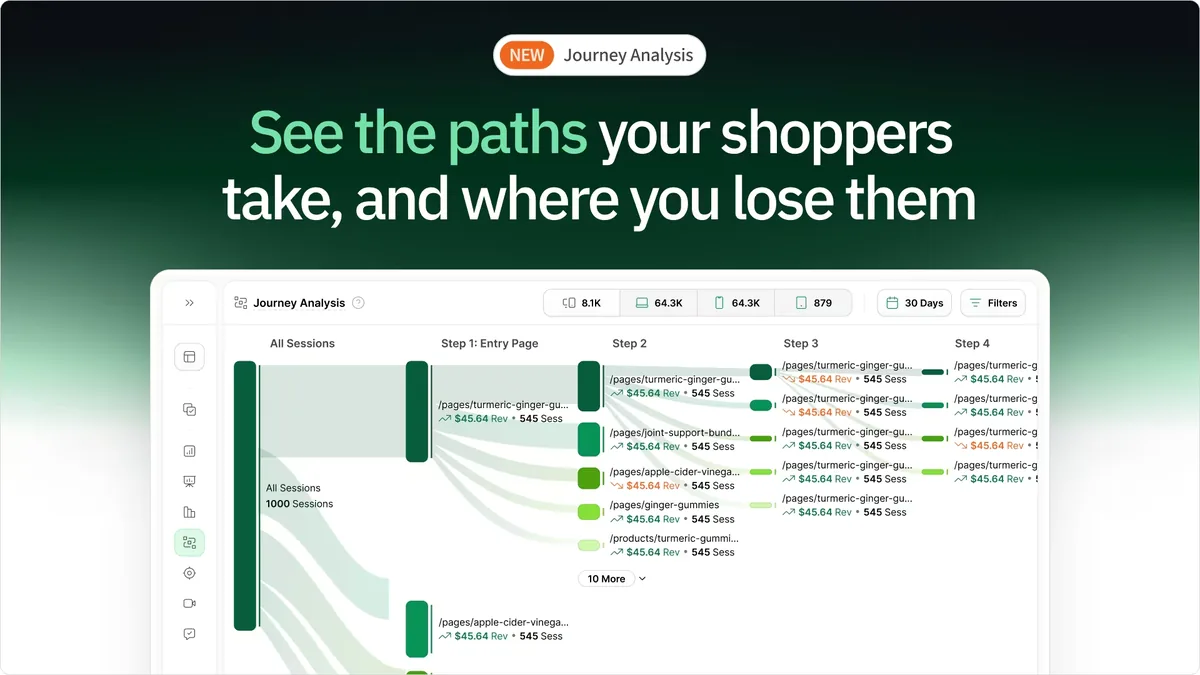
Choosing the right website analytics tool can be overwhelming, with so many options available. In this guide, we’ll dive into a head-to-head comparison of two industry giants - Mouseflow and Hotjar - and introduce a third contender: heatmap. We’ll explore their features, pricing, and real user feedback to help you decide which tool will best meet your business needs.
TL;DR- Mouseflow or Hotjar? (Maybe Neither)
- Go with Mouseflow if you need advanced session recording features like rage clicks and U-turn detection. It's ideal for UX/UI teams and marketers looking for detailed behavioral insights, but session limits and pricing can be restrictive for high-traffic websites.
- Go with Hotjar if you want a widely recognized tool with strong user feedback options and heatmaps. It’s a solid choice for qualitative insights, but tiered pricing and limited features in lower plans can make scaling expensive.
- Go with heatmap if you're focused on maximizing revenue through actionable insights. It’s the only platform that links user behavior directly to revenue, offering AI-powered recommendations and unlimited data storage with transparent, revenue-based pricing. Perfect for ecommerce and data-driven businesses.
| Details | heatmap.com | Mouseflow | Hotjar |
|---|---|---|---|
| Pricing | $89/month (for $0 - $1M ARR) | $129/month (Growth Plan - 15,000 sessions) | $99/month (Business Plan - 500 daily sessions) |
| Pricing Model | Revenue-based | Monthly sessions | Daily sessions |
| Free Trial | Yes. 7 days (no restrictions) | Yes. 14 days | Yes. 30 days (for businesses only) |
| Key Features | Revenue heatmaps, AI insights and recommendations, scrollmaps, session recordings, A/B testing | Session recordings, form analytics, rage clicks & U-turn detection, geo heatmaps | Heatmaps, session recordings, surveys, feedback |
| Data Storage | 365 days (unlimited for enterprise) | 3 - 12 months (depending on the plan) | 365 days |
| Customer Support | Email, live chat, dedicated Slack channel, & CS manager | Email, live chat | Priority support for Enterprise |
| AI Recommendations | Yes | No | No |
| User Rating | 4.4/5 | 4.6/5 | 4.3/5 |
| Best For | eCommerce & revenue-obsessed teams | UX/UI optimization & session tracking | General website analysis & user feedback |
Still undecided? Let’s take a closer look at the unique features, pros and cons, pricing, and user reviews of Mouseflow and Hotjar to guide you in making the best decision for your business.
What is Mouseflow
G2 Rating: 4.6/5 (665 reviews)
Best for: Digital marketers, UX/UI designers, product managers, and development teams looking to optimize user experience, improve conversion rates, and gain actionable insights from user behavior on websites.

Mouseflow is a powerful behavior analytics tool designed to help businesses understand how users interact with their websites. It lets you track mouse movements, clicks, scroll depth, and even rage clicks, providing a comprehensive view of how users engage with your site. Its robust data collection capabilities allow businesses to gain both qualitative and quantitative insights, making it an excellent choice for improving website performance, optimizing conversion funnels, and enhancing user experience.
Mouseflow’s Key Features
- Session recordings: Mouseflow records real user sessions, allowing you to watch exactly how visitors interact with your website, including mouse movements, clicks, and scrolling behavior.
- Form analytics: Mouseflow’s form analytics allows you to track how users interact with web forms. You can see where users drop off, which fields are causing friction, and how to improve form completion rates.
- Funnels & conversion tracking: Mouseflow lets you build custom conversion funnels and track user progression across different stages of the funnel.
- Rage clicks and U-turns: Mouseflow automatically detects and highlights rage clicks (when users repeatedly click in frustration) and U-turns (when users abruptly leave a page after visiting). These indicators help identify areas where users may be experiencing frustration or confusion.
- Geo heatmaps: With geo heatmaps, Mouseflow shows how users from different geographic locations engage with your site. This can be particularly useful for international businesses or campaigns targeting specific regions.
What is Hotjar
G2 Rating: 4.3/5 (307 reviews)
Best for: Website owners, digital marketers, product teams, and UX designers aiming to enhance user experience and make data-driven decisions to drive business growth.
Hotjar is a robust user behavior analytics tool that helps businesses gain a deeper understanding of how users interact with their websites. By providing detailed insights into user behavior, Hotjar allows website owners to optimize site design, improve user experience, and boost conversion rates. With its suite of features like heatmaps, session recordings, and user feedback tools, Hotjar makes it easier to pinpoint areas that need improvement while collecting actionable data directly from visitors.
Hotjar’s Key Features
- Heatmaps: Hotjar’s heatmaps visualize user interactions, including clicks, taps, and scrolling behavior. This allows website owners to see which elements attract attention and which areas are being ignored.
- Conversion funnels: With Hotjar’s conversion funnels, you can track user progress through predefined steps on your website, identifying where users drop off in the process.
- User feedback tools: In addition to surveys and polls, Hotjar also includes on-site feedback widgets that allow users to rate their experience or leave comments. This provides a simple way to collect actionable user insights.
- Session replay and debugging: Hotjar’s session replay functionality lets you review user interactions with your website in real-time. This feature is valuable for spotting technical issues, such as JavaScript errors, broken links, or slow load times, that may be affecting user experience.
- Custom tags and attributes: With Hotjar, you can tag sessions based on custom user attributes or behaviors. This feature helps track specific events or actions on the site, providing a more tailored analysis of user activity.
What Users Like About Mouseflow
- Advanced session replay filtering: One of the standout features that users appreciate is the advanced session replay filtering. This allows businesses to drill down into specific user behaviors and focus on sessions that meet certain criteria, such as geographic location, device type, or custom tags.
- User-friendly interface: Mouseflow is praised for its intuitive and easy-to-navigate dashboard, making it accessible to both novice and experienced users.
- Powerful form analytics: Mouseflow’s form analytics feature is a favorite among users. Tracking form submissions and abandonment rates helps businesses understand where users struggle with filling out forms.
Considerations Before Using Mouseflow
- Limited session limits: Some users feel the session limit on paid plans is restrictive, running out of available sessions quickly, particularly for heatmap-focused use cases.
- Heatmap issues: Users report occasional challenges with heatmaps, such as struggles with animations, overlays, and unexpected exclusions of certain pages.
- Funnel setup complexity: Users noticed that funnel analysis feature lack flexibility, making it difficult to view open funnels or incorporate tags and variables instead of just URLs.
- Cost concerns: Several users find Mouseflow’s pricing high for the features provided.
👋 How heatmap is different: Heatmap offers deeper, revenue-focused insights compared to Mouseflow. It ties each click to revenue, providing AI-driven recommendations, customizable filters, and seamless CMS integrations. Unlike Mouseflow, Heatmap avoids session limits (with ARR-based pricing) and heatmap-related bugs, offering a more flexible, cost-effective solution for ecommerce optimization.
What Users Like About Hotjar
- Effective heatmaps and session recordings: They provide valuable insights into user behavior. The heat map data and session replay functionalities allow businesses to track clicked elements and mouse movements.
- Customizable features: Users appreciate the ability to tailor Hotjar’s feedback collection, including targeting specific pages and different user attributes. This customization helps businesses gather qualitative data relevant to specific user behavior.
- Survey and feedback tools: Hotjar’s survey tools, including on-page surveys and polls, are particularly praised for their ease of use and their ability to gather user feedback.
Considerations Before Using Hotjar
- Data accuracy concerns: Some users question the accuracy of the heatmap data and session recordings, particularly when distinguishing between genuine user behavior and “fake” traffic.
- Difficulty converting insights into action: While session recordings and heatmaps vs session recordings are valuable for visualizing user interactions, many users report challenges in transforming these insights into actionable improvements.
- Pricing concerns: Many users believe Hotjar’s pricing is excessive, with key features frequently limited to premium plans or locked behind paywalls.
- Customer support issues: Some users have expressed concerns about the responsiveness of Hotjar’s customer support, which can lead to delays in resolving technical issues.
👋 Heatmap.com provides a more intuitive tracking system with AI-powered CRO recommendations, delivering actionable insights without affecting site speed . Users appreciate its responsive customer support and ARR-based pricing, making it a cost-effective alternative to Hotjar’s session-based model for scaling websites.
Read more about how Hotjar stands against other players in the market:
What Actual Users Say About Mouseflow
- Positive Review: "An indispensable tool for understanding user behavior. Session replay has enabled us to obtain unmatched information about user behavior, thereby enabling us to recognize pain points and optimize user journeys with laser precision. Advantages I see 1 is Intuitive Session Replay: At every single session, we can see each activity carried out by individuals visiting our website from the mouse movements to clicks made on it by utilizing this Mouseflow option in the replay mode" Ram V. - Product Manager
- Critical Review: "It's quite clunky to use and the funnel data didn't tally up with other data sources I use. They also don't send you auto-renew reminders and so I had a years subscription taken out in advance, that they weren't willing to refund on. I wouldn't mind so much but they don't even send auto-renew reminders. The product itself is below average, there are better solutions out there." A User in Gambling & Casinos
What Actual Users Say About Hotjar
- Positive Review: "Powerful tool for user insights. Hotjar is incredibly intuitive, offering valuable heatmaps, session recordings, and feedback tools that help us better understand user behavior and improve our website performance." Sidra A. - Software QA Analyst
- Critical Review: "The experience with Hotjar was really good but the prices was too high and the support is not very good either." Filipe C. - Digital Marketing & E-commerce Manager
What People Are Saying About heatmap 🔥
- "We're up 23% YoY" - Ashvin Melwani. "With heatmap, I've been able to figure out what elements actually increase AOV and optimize our landing pages to drive more first purchase profitability..."
- "$71,286 per month in revenue with 97% significance." - Spencer Pawliw after he downloaded heatmap, waited for 5k sessions, and reorganized products based on the highest revenue per session from top left to bottom right.
- "Heatmap is a non-negotiable for all Ecom stores!" - Oliver Kenyon.
Obvi Added $2.5M Revenue in Their First Month with heatmapAI
By using heatmapAI, Obvi addressed a common challenge for scaling DTC brands: balancing growth and profitability. They leveraged actionable insights to identify which elements increased AOV and optimized landing pages to drive more first-purchase profits.
100x
ROI with Obvi's first month using heatmap
$2.5M
in added revenue using our CRO recommendation engine
+7.81%
Increase in Revenue Per Session
Comparing Mouseflow and Hotjar’s Pricing
Mouseflow and Hotjar cater to diverse business needs with tiered pricing models.
Mouseflow starts at $39/month for 5,000 sessions and scales to $499/month for 150,000 sessions, with an Enterprise option for 200,000+ sessions. Hotjar offers a free plan with 35 daily sessions and paid plans from $39/month to $213/month, including advanced features like user behavior analytics and priority support. Both provide free trials and scalable options for growth.
Here’s a breakdown of the costs and features for each platform:
| Pricing Details | heatmap.com | Mouseflow | Hotjar |
|---|---|---|---|
| Free Plan | 7-day trial (no restrictions) | 14-day free trial | Free plan with 35 daily sessions |
| Most Popular Plan | $89/month | $129/month (Growth Plan) | $99/month (Business Plan) |
| Pricing Model | Revenue-based | Monthly sessions | Daily sessions |
| Key Features Offered in Most Popular Plan | Interactive revenue-based heatmaps, scrollmaps, session recordings, AI recommendations, dedicated Slack channel | Session recordings, form analytics, conversion funnels, rage clicks & U-turns | Heatmaps, session recordings, feedback tools, conversion funnels |
| Advanced Features (Higher-Priced Plans) | Unlimited data storage, dedicated CRO manager, real-time AI modeling | Advanced filtering, larger session limits, geo heatmaps | Funnels and trends, behavior filters, priority support |
| Data Storage | 365 days (unlimited for enterprise) | 3–12 months, depending on the plan | 365 days |
| Custom Plans (for Enterprise) | Yes | Yes | Yes |
Bottom line:
- Mouseflow provides robust analytics tools with advanced features like rage clicks and U-turns, but session-based pricing can become restrictive for high-traffic websites. Limited data storage and funnel complexity can add challenges for teams looking for seamless scalability.
- Hotjar offers an intuitive interface and strong user feedback tools, making it ideal for qualitative insights. However, its tiered session-based pricing and advanced features locked behind premium plans can make it less budget-friendly for growing businesses or high-volume users.
- heatmap stands out with its revenue-based pricing, unlimited data storage, and AI-driven insights. It eliminates session-based restrictions and hidden fees, making it the go-to choice for ecommerce businesses and data-driven teams aiming for maximum insights without unpredictable costs.
Still not sure Mouseflow vs Hotjar? Test-drive all three tools with their free trials to find the one that fits your needs.
Have you tried heatmap.com
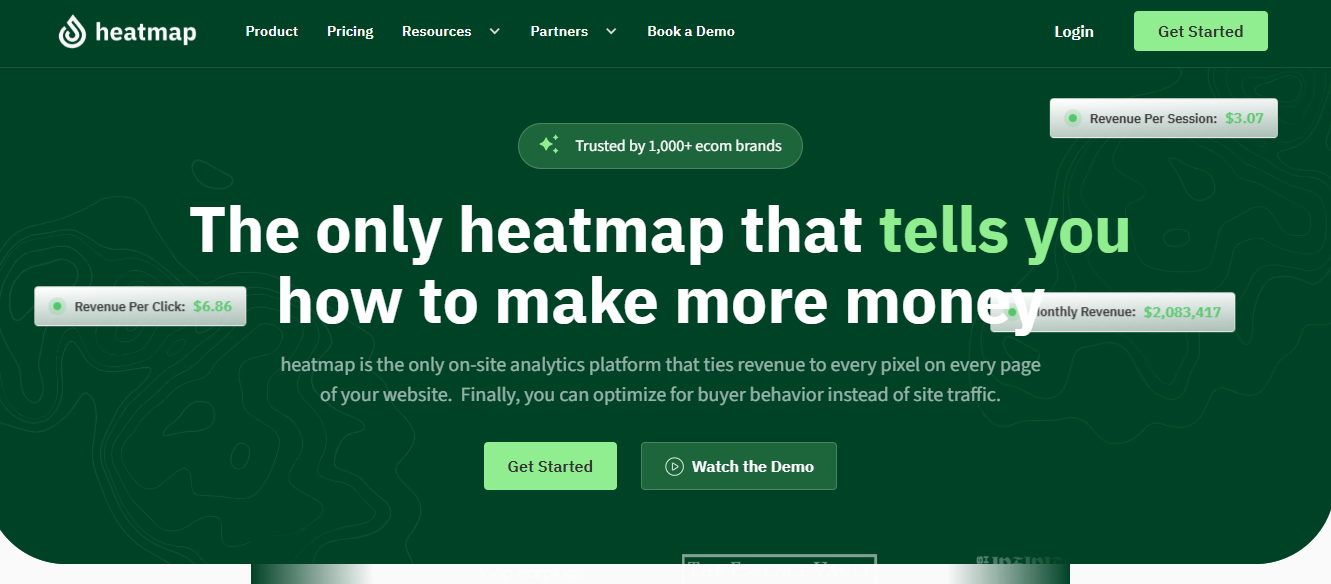
Looking for more than basic heatmaps? heatmap.com ties every click to revenue, revealing high-value areas and buyer behavior. With AI-driven insights and revenue-based tools like heatmaps and scrollmaps, it helps eCommerce brands optimize for revenue per session. Easy integration makes boosting sales simple and effective.
Why teams choose heatmap.com over other analytics tools 🏆

Key features
- Revenue-based heatmaps: Analyze the revenue impact of every click on your site. With custom filters for behaviors, average order value (AOV), and traffic sources, these heatmaps offer actionable insights into user interactions.
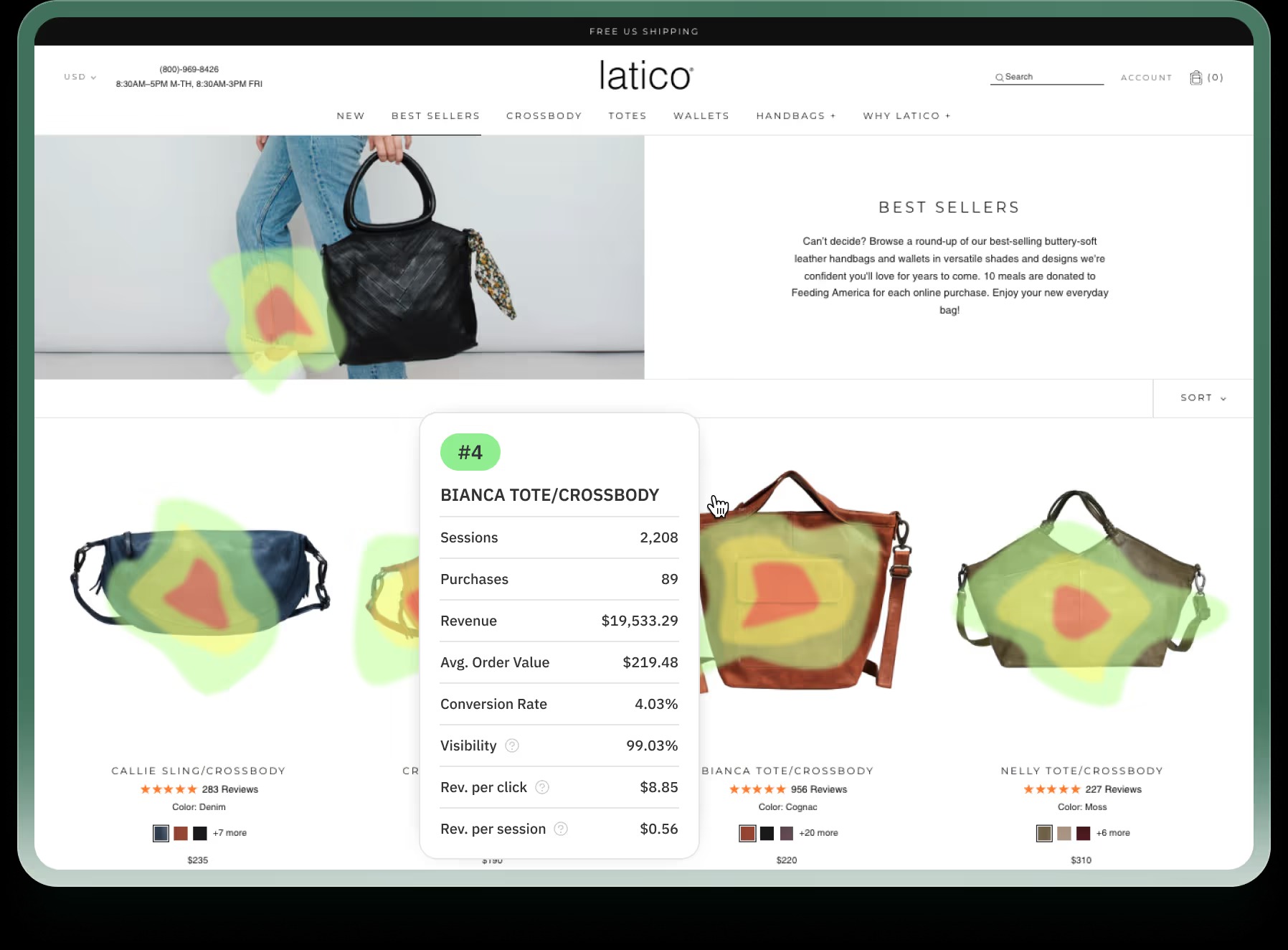
- AI-powered insights: Struggling to interpret data from tools like Mouseflow and Hotjar? heatmap’s AI engine translates behavioral data from session recordings into clear recommendations—adjust copy, rearrange sections, enhance visuals, and more—to make optimization smarter and more revenue-focused.
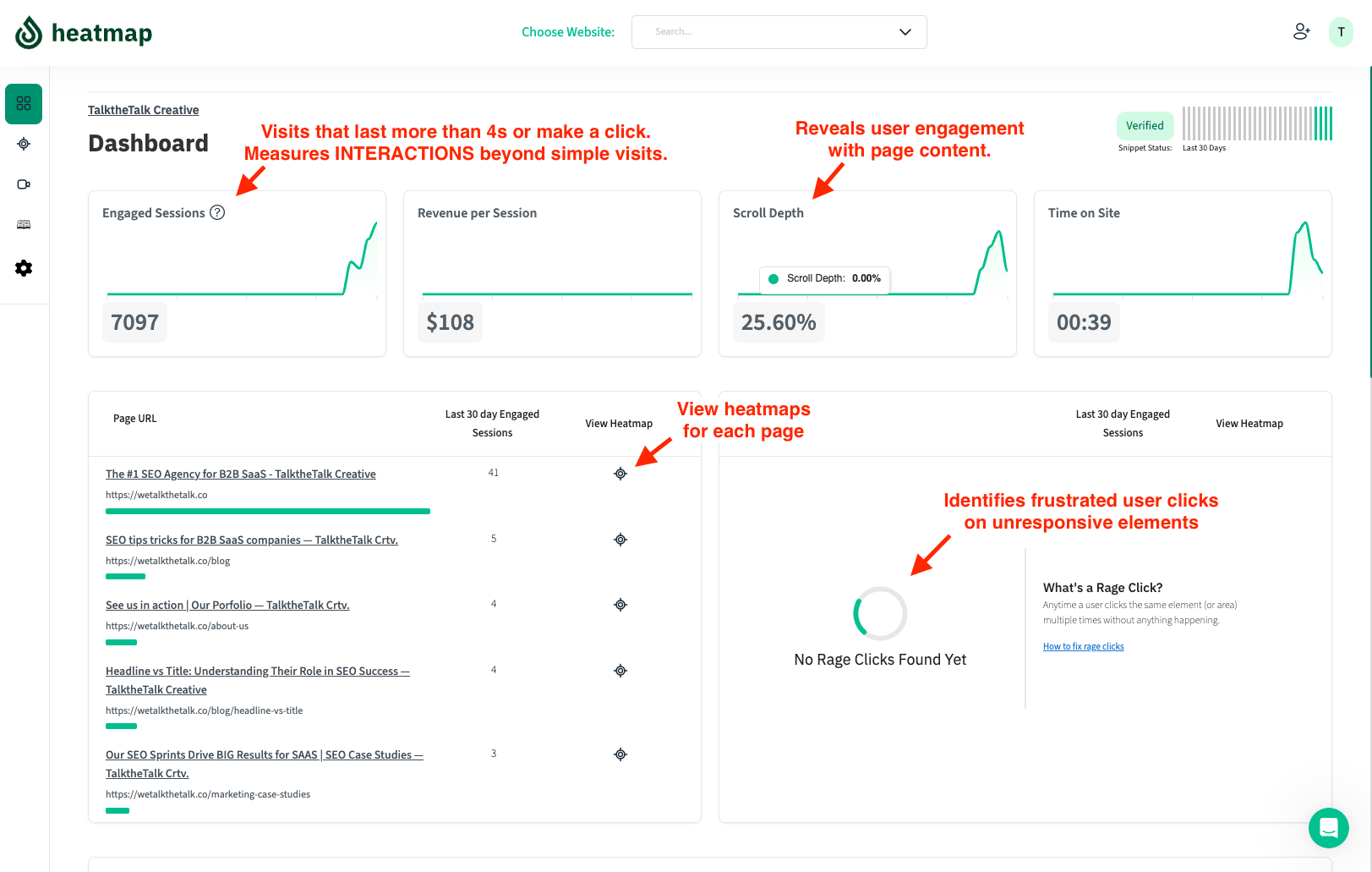
- Intuitive dashboard & metrics: heatmap’s dashboard provides quick access to key metrics like revenue per session, scroll depth, and high-traffic pages, allowing for seamless performance analysis and data-driven decisions.
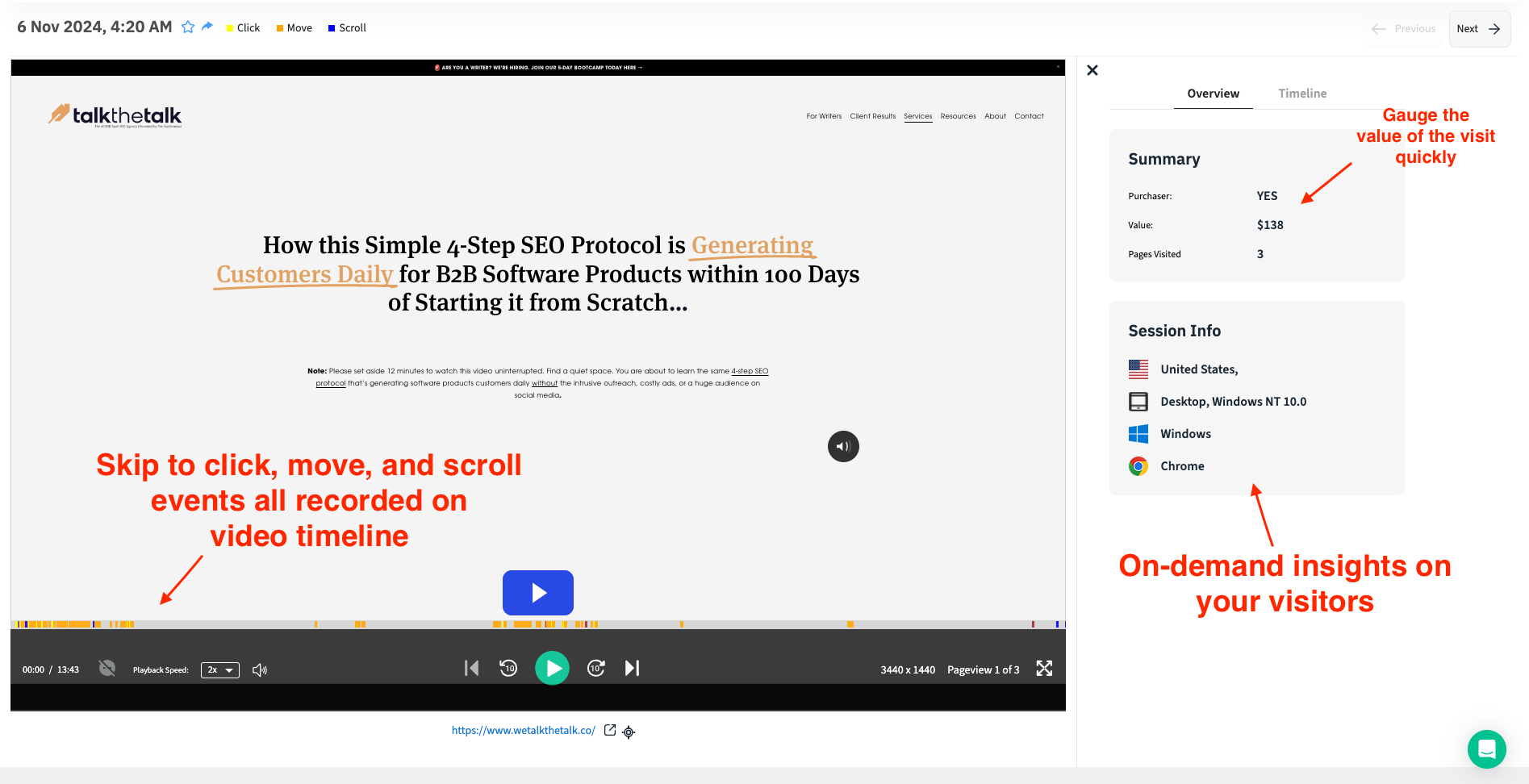
- Reliable session recordings: Unlike other platforms, which sometimes miss sessions or record inconsistently, Heatmap ensures accurate, smooth session recordings, delivering actionable insights to optimize user experiences effectively.
Other useful features of heatmap
- Dynamic scrollmaps: Visualize revenue drop-off points across your site, offering insights that extend beyond basic user interaction data to pinpoint where interest wanes and revenue potential is lost.
- Cohort comparison: Compare different customer segments, such as buyers vs. frustrated users, high vs. low AOV customers, and first-time vs. repeat visitors, enabling data-backed A/B testing and segmentation strategies.
- Customizable filters: Apply over 12 filter options, including custom settings, to analyze data by AOV, traffic source, session type, and more, allowing for precise, tailored insights.
- JavaScript error monitoring: Leverage AI to detect JavaScript errors affecting site performance, with quick, actionable recommendations to resolve issues and improve user experience.
- Rage click & high-engagement page detection: Identify pages with high user engagement or frustration (e.g., rage clicks), using this data to optimize the user experience and reduce bounce rates.
- Revenue Per Session (RPS) tracking: Exclusive to HeatmapAI, RPS calculates the revenue generated by each page element based on user visits, providing an accurate ROI metric for each part of your website.
- Privacy-conscious analytics: Heatmap is fully compliant with GDPR and CCPA regulations, ensuring user data is anonymized without compromising session insights. While both Mouseflow and Hotjar have some privacy features, heatmap’s no-cookie, no-IP logging policy goes a step further in safeguarding privacy while still delivering detailed tracking data.
- Site performance monitoring: Built-in tools track site speed and offer optimization suggestions to reduce load times and enhance user satisfaction.
- Universal integrations: heatmap seamlessly integrates with all major CRM systems and e-commerce platforms, including Shopify, BigCommerce, WooCommerce, and even custom-built websites.
Heatmap is the best Mouseflow / Hotjar alternative - try free for 14 days.
Heatmap.com is the only on-site analytics platform that ties revenue to every pixel on every page of your website. Finally, you can optimize for buyer behavior instead of site traffic.

Spencer Pawliw
@spencepawliw+ $71,286 per month in revenue with 97% significance.
How You Can Do It:
1: Download heatmap.com
2: Wait for 5k sessions
3: Reorganize products based on the highest revenue per session from top left to bottom right.

Dylan AnderPublished December 1, 2025